
Our available controls: Rainier Blinds offers Roman and woven wood shades with motorized operation only. Available controls and power options for other products are confirmed at your consultation.
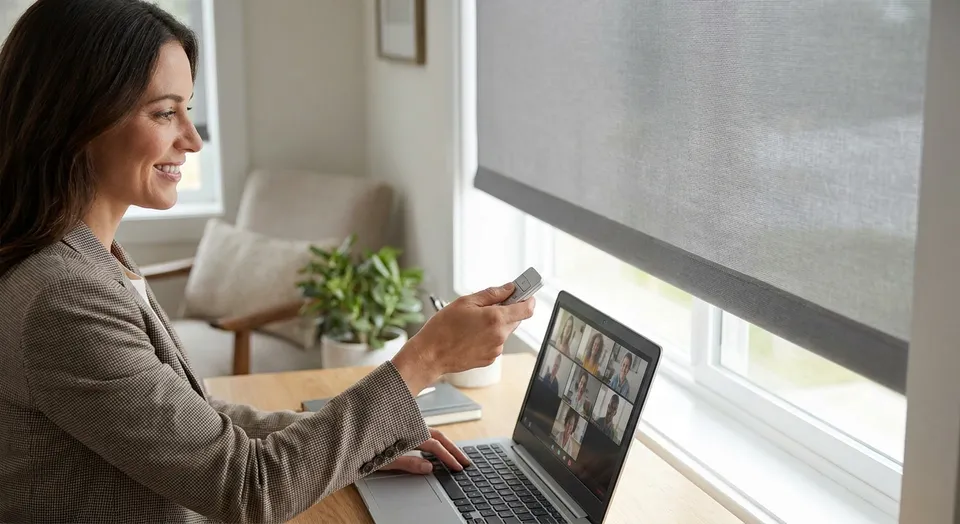
Glare on a video call comes from one direction almost every time: a window behind or beside your screen throwing light straight into the camera lens. Motorized shades fix it in seconds without you touching a wand or blinking through a webcam adjustment mid-meeting.
- Motorized shades set on a lighting schedule cut video call glare without manual adjustment, and light-filtering fabrics outperform sheers for camera clarity.
- Solar shades with a 3-5% openness rating are the buy for west-facing home offices in the Pacific Northwest.
- Programming a fixed morning and afternoon position beats leaving shades on a single set-and-forget level.
- Skip mirrored or high-sheen roller fabrics because they bounce light back into the lens instead of diffusing it.
Why this matters
Webcams expose badly compared to your eyes. A window that looks fine to you in person turns into a blown-out white rectangle on a Zoom feed, and everyone on the call sees a silhouette instead of a face. This is the single most common complaint from remote workers using motorized shades for video call-ready home offices as their fix.
Manual blinds don't solve this reliably because nobody remembers to adjust them before a 9am call. A shade on a schedule closes to the right position automatically, every day, at the same time the sun hits your window. That consistency is the actual fix, not just having shades but having them move without you.
What you'll need
- A window directly behind, beside, or facing your desk setup
- Motorized roller or cellular shades with a light-filtering or solar fabric (not sheer, not blackout unless you also want the room dark)
- A remote, wall switch, or smart home app to control the shade
- 10-15 minutes to test camera exposure at different shade positions
- Optional: a smart hub if you want shades to trigger automatically based on time or a calendar event
The steps
1. Identify the glare source, not just the bright window
Sit at your desk with your camera on and look at the preview, not the room. Note whether the light is hitting your face directly (backlight) or bouncing off a wall or monitor into the lens (reflected glare), because the fix differs for each.
Direct backlight from a window behind your monitor is the worst offender because the camera auto-exposes for the brightest thing in frame, which turns your face dark. Reflected glare off a glossy desk or monitor bezel needs the shade angled or partially lowered rather than fully closed. Common mistake: closing shades fully when partial coverage would preserve natural light on your face while killing the hot spot.
2. Pick the right fabric openness, not just blackout or sheer
Compare solar or light-filtering samples at the actual time of your video calls. Openness is one fabric property; color, glazing, room lighting, and camera settings also affect glare and the appearance of your face on screen.
West-facing offices in the Seattle area get the harshest low-angle afternoon sun, and that's exactly the scenario covered in solar shades for west-facing windows. A 3% or 5% openness fabric is the standard recommendation for that exposure. Skip sheer fabrics for camera work; they scatter light rather than blocking it, and on video that reads as a hazy, low-contrast frame instead of a clean one.
3. Program a fixed position for your call hours
One-touch scheduling is what separates a shade that actually solves glare from one that just sits there. Set the shade to move to a specific closed or partial position 15 minutes before your first scheduled call block and hold it through your last one.
Detailed setup for scenes and schedules lives in how to program motorized window shades. Most systems let you name a scene like Morning Calls and trigger it daily at a set time. Expected outcome: you stop thinking about the window entirely because the shade already moved before you sat down. Common mistake: programming one position for the whole day instead of separate morning and afternoon scenes when the sun angle shifts.
4. Test camera exposure at three shade positions
Use your camera preview to compare fully open, partly lowered, and closed positions at the time of the call. Choose the setting that balances screen glare, background brightness, and light on your face; there is no universal closing percentage.
Record which position looks best on camera, then lock that as your scheduled setting. This takes five minutes and eliminates guesswork every day after.
5. Add a secondary light source before you rely on shades alone
A desk lamp or ring light pointed at your face, angled about 45 degrees, fills in shadow that a closed shade can create once you cut the window's contribution. This matters because a fully closed shade removes glare but also removes your main light source, and a dim room reads just as badly on camera as a blown-out one.
A simple clip light can help in many rooms. Expected outcome: even, front-facing light with zero backlight competing against it.
6. Pair the schedule with a smart hub for calendar-based triggers
Calendar-triggered shade scenes depend on the selected platform and supported integrations. Confirm those features before ordering; a supported time-based schedule may be a simpler option.
Common mistake: setting up the automation once and never revisiting it as your work hours change through the seasons. Daylight hours in the Pacific Northwest shift by several hours between June and December, and a schedule set in summer 2026 won't hold through winter.
Get your home office measured
Rainier Blinds measures and installs motorized shades across the Seattle area.
Troubleshooting
- If glare remains with the shade closed, check the fabric, light gaps, screen position, and room lighting. Compare a denser or opaque sample as needed rather than assuming a specific openness change will solve every camera issue.
- Room goes too dark once the shade closes: you likely picked a fabric closer to blackout than light-filtering; swap to a true solar or light-filtering fabric that diffuses rather than blocks.
- Shade moves at the wrong time: the schedule was set once and never adjusted for seasonal daylight shift; re-set the trigger time every few months, not just at initial setup.
- Automation doesn't trigger from the smart hub. Check the hub's Wi-Fi connection first; most motorized shade failures trace back to router range, not the shade motor itself.
- Glare comes back mid-call as the sun moves: a single fixed position won't cover a two-hour call window; program a mid-call adjustment scene if your calls regularly run long.
- Battery-powered shades stop responding: check charge status before assuming a mechanical fault; see how to maintain motorized window shade batteries for charging intervals.
Tools and resources
- Camera preview app on your laptop or phone to test exposure in real time
- A remote or wall switch for manual override outside of scheduled hours
- A light meter app (free on most app stores) if you want to measure lux rather than eyeball it
- Desk lamp or ring light rated around 3000-4000K for a natural skin tone match on camera
What to do next
Once glare is under control, the next variable worth fixing is contrast between your face and the wall behind you. A shade that solves the window problem won't fix a dark accent wall eating your exposure. Start there once the window is handled, and revisit your fabric choice each spring and fall as daylight hours shift through 2026.
FAQ
What's the best shade type to reduce video call glare?
For video calls, select a fabric that controls the actual glare while keeping enough light for the room. Try samples at call time and check the camera preview; no openness range is best for every home office.
Is motorized better than manual for glare control?
Yes, motorized shades on a schedule are better because they move automatically before your call starts, while manual shades depend on you remembering to adjust them every day.
How much does a motorized shade setup cost for a home office?
Cost varies by window size, fabric, and motor type, so get a measured quote for your specific window rather than relying on a general estimate.
Can I fix video call glare without replacing my blinds?
You can reposition your desk or add a supplemental light, but a window directly in your camera's frame usually still needs a light-filtering shade to fully resolve the glare.
Do blackout shades work for video calls?
Blackout shades remove the glare source but also remove your main light, leaving your face underexposed; light-filtering or solar fabric is the better fit for camera use.
How do I stop shades from closing at the wrong time?
Reset your automation schedule seasonally, since daylight hours shift significantly between summer and winter in the Pacific Northwest and a schedule set once won't hold year-round.
What openness percentage should I use for a west-facing office window?
West-facing windows get harsh low-angle afternoon sun, so 3% openness solar fabric is the standard recommendation over 5% or higher for direct glare control.
Will a smart hub make shade automation easier?
Yes, a smart hub lets shades trigger off your calendar or a fixed schedule instead of manual control, which matters most if your call times shift week to week.
One last thing
Most people fix glare by closing the shade all the way and call it done, then wonder why their face reads flat and dim on the next call. The actual fix is partial closure tuned to your specific camera's exposure, tested once and locked into a schedule, not a single all-or-nothing setting.