
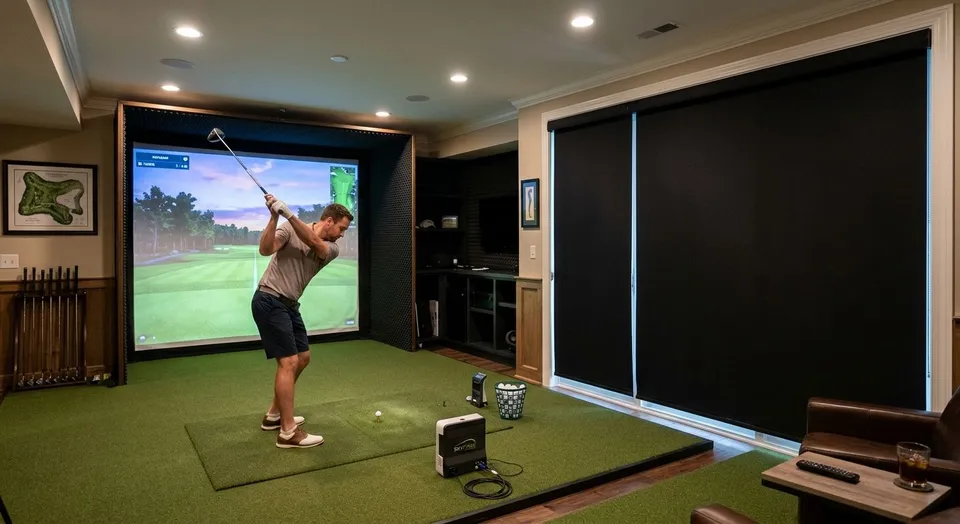
Consultations are free within 60 driving miles of Auburn. Farther projects are considered individually; any consultation or travel fee is quoted before booking and credited toward your order if you proceed.
Blackout shades for golf simulator rooms block every trace of daylight so the projector image stays sharp and the launch monitor reads ball flight without glare interference. A simulator room has different needs than a bedroom or media room: the space usually sits inside a converted garage, bonus room, or basement with one or two windows that were never meant to go fully dark, and any light bleed around the edges washes out the screen and confuses camera-based tracking.
- True blackout roller or cellular shades, not "room darkening" fabric, are the baseline for golf simulator rooms in 2026.
- Side-channel or inside-mount installs close the light gaps that cause screen glare and bad launch monitor reads.
- Motorized shades let you black out the room without walking past the hitting area or projector beam.
- Rainier Blinds measures and installs blackout shades for simulator rooms across the Greater Seattle Area.
Why blackout shades matter for golf simulator rooms
A golf simulator depends on two things staying consistent: the projected image and the launch monitor's read on the ball. Daylight coming through an untreated window or around a loose-fitting shade lowers contrast on the screen and can throw off camera-based or infrared monitors that expect steady ambient light.
Most simulator rooms weren't built as simulator rooms. They started as a garage bay, a bonus room over the garage, or a basement rec room, which means the windows are standard residential sizes with standard hardware, not anything designed for full blackout. That gap between what the room was built for and what it's being used for now is exactly where light leaks come from, and it's the first thing to fix before you buy any blackout shades for bedrooms style product and expect the same result in a simulator setup.
Audit every light source in the room
Walk the room at the time of day you actually play. Morning light and afternoon light hit differently, and a shade that handles one may not handle the other.
- Check for gaps around the window frame itself, not just the shade
- Note any secondary light source: a door with a window, a skylight, a transom above the main window
- Look for reflective surfaces (mirrors, glossy flooring) that bounce residual light onto the screen
- Flag any window that faces the projector directly versus one behind the hitting mat
- Mark whether the window is inside the simulator enclosure or outside it
Measure for full-width, full-height coverage
Blackout only works when the shade covers the entire window opening with no visible gap on any side. A shade that's an inch narrower than the frame lets in a sliver of light that's disproportionately distracting on a dark screen.
- Measure width and height at three points (top, middle, bottom / left, center, right) since older frames are rarely square
- Decide between inside mount (cleaner look, less light control) and outside mount (better blackout, needs 2-3 inches of frame or wall on each side)
- Add mounting depth for the headrail if the window sits near a soffit or beam
- Confirm clearance if a hitting net, enclosure frame, or projector mount sits close to the window
- This is the step where a DIY tape-measure job most often goes wrong, and it's the point where a professional measure starts to pay for itself
Rainier Blinds' in-house measure and install crew handles this exact clearance math on every simulator room job, which is faster than re-measuring twice after a shade arrives too narrow.
Choose a true blackout fabric, not just "room darkening"
"Room darkening" and "blackout" get used interchangeably by big-box retailers, but they aren't the same thing. Room darkening fabric cuts most light; blackout fabric is engineered to block essentially all of it.
- Ask specifically for blackout-rated fabric, not light-filtering or room-darkening
- Zebra shades with alternating opaque and sheer bands are not a blackout product on their own, even in the closed position, because the sheer bands still pass light
- Cellular blackout shades add an insulating honeycomb structure, useful if the simulator room also needs temperature control
- Roller blackout shades in a matte, non-reflective finish avoid throwing secondary glare back at the screen
- Confirm the fabric is opaque enough that you can't see a lit bulb through it when held up to a window
Verdict: skip zebra shades and light-filtering roller fabric for the simulator window itself; they're built for privacy and glare reduction, not full blackout.
Pick the mount type that seals the frame
The mount decides how much light escapes around the shade, and it matters more in a simulator room than almost anywhere else in the house.
- Outside mount with side channels traps light on both edges, the single biggest upgrade for full blackout
- Reveal or inside mount looks cleaner but typically leaves a small light gap on each side unless the fabric is cut wide
- A headrail that sits flush against the wall or trim closes the top gap
- A bottom bar with a weighted or sealed edge stops light creeping in underneath
- For a window right behind the screen, side channels are worth the extra hardware even if you skip them elsewhere in the room
Decide between manual and motorized operation
Every blackout shade Rainier Blinds installs comes in manual, motorized, or smart versions, and the right tier for a simulator room depends on how the space gets used.
- Manual works fine for a room used mostly at fixed times of day, where you set it once and leave it
- Motorized lets you black out the room from a remote or wall switch without walking through the hitting area or in front of the projector beam
- Smart shades add scheduling, so the shade closes automatically before a scheduled tee time or practice session
- If the window sits behind or beside the screen, motorized is worth the upgrade just to avoid casting a shadow across the image while you reach for a cord
- Battery-powered motorized options avoid running new wiring in a finished garage or bonus room
Layer drapery only if you want zero light bleed at edges
Drapery on its own isn't a blackout solution, but layered over a blackout shade it closes the last inch of light that even a good side-channel install can miss.
- Use blackout-lined drapery, not standard decorative fabric, if you go this route
- Mount the rod wide enough that the panels clear the shade by several inches on each side
- Reserve this for windows with the worst light leak, not every window in the room
- Skip it if the room already reads fully dark with the shade alone; it adds cost without adding function
Plan installation around simulator equipment placement
A simulator enclosure, net, or screen frame often sits inches from the window, which limits what a technician can access after the equipment is set up.
- Install shades before the enclosure goes up if the room is still being built out
- If the enclosure is already in place, confirm headrail depth and mounting brackets can be reached without disassembling the frame
- Note where the projector throws its beam so the shade's cassette or headrail doesn't cast a shadow on the screen
- Coordinate timing with any electrician work if you're adding motorized shades with hardwired power
Get your simulator room measured
Book an in-home consultation to compare samples and get a measured quote.
Comparing blackout options for simulator rooms
| Option | Best for | Key limitation |
|---|---|---|
| Blackout roller shades | Single windows behind or beside the screen | Needs side channels or outside mount for full blackout |
| Blackout cellular shades | Rooms that also need temperature control | Bulkier headrail than a roller shade |
| Blackout-lined drapery | Closing residual edge light after a shade install | Not a standalone blackout fix on its own |
| Zebra shades | Daytime privacy and glare control, not full blackout | Sheer bands pass light even when closed |
| DIY blackout film | Temporary fix for a rental or short-term setup | No opacity guarantee, peels and yellows over time |
Verdict: blackout roller or cellular shades with an outside mount and side channels are the correct call for a simulator room; zebra shades and DIY film are workarounds, not fixes.
Common mistakes golf simulator room owners make
- Buying "room darkening" instead of blackout — the fabric names sound similar but the light-blocking performance is not, and a simulator screen shows the difference immediately
- Choosing an inside mount to save a few inches of wall space — the light gap it leaves is exactly where screen glare comes from
- Skipping motorization because the room is small — small rooms are often the ones where reaching a manual shade means walking through the hitting zone
- Measuring once and ordering fast — a shade cut an inch short on a simulator window is a bigger problem than the same gap in a living room
- Forgetting the door — a door with a window panel next to the hitting bay leaks as much light as the window itself and gets overlooked in the initial walk-through
FAQ
What's the best window treatment for a golf simulator room?
Blackout roller or cellular shades with an outside mount and side channels are the best option for golf simulator rooms in 2026. They block ambient light that washes out the projector image and interferes with launch monitor accuracy.
Do zebra shades work for golf simulator blackout?
No. Zebra shades alternate sheer and opaque bands and still pass light through the sheer sections even when fully closed, so they work for daytime privacy but not full blackout.
Is motorized better than manual for a simulator room?
Motorized is the better fit if the window sits near the hitting area or screen, since it lets you close the shade without walking through the swing path or projector beam. Manual works fine for rooms used at a consistent time of day.
How much light leak is too much for a simulator room?
Any visible gap around the shade edges is enough to show up as glare on the screen or interference on camera-based launch monitors. Outside mounts with side channels close that gap; inside mounts often leave a small one.
Can I use blackout curtains instead of shades in a simulator room?
Blackout-lined drapery works well layered over a blackout shade to close residual edge light, but on its own it rarely seals a window as tightly as a properly mounted shade.
Do I need blackout shades if my simulator room has no windows?
No. If the room has no exterior windows and no interior windows facing a lit hallway or room, blackout shades aren't necessary.
What's the difference between room darkening and blackout shades?
Room darkening fabric blocks most light but still allows some through; blackout fabric is built to block essentially all of it. Simulator rooms need true blackout, not room darkening.
Does Rainier Blinds install blackout shades for home golf simulator rooms?
Yes. Rainier Blinds measures and installs blackout roller and cellular shades for simulator rooms across Auburn, Bellevue, Tacoma, Seattle, and the surrounding area, with its own crew handling both the measure and the install.
One last thing
The window that causes the most trouble in a simulator room usually isn't the one directly in front of you, it's the one off to the side that you stop noticing after the first week, right up until a bright afternoon makes the screen unreadable. Walk the room at the worst time of day before you order anything, not the best time.